instrument panel TESLA MODEL S 2017 (UK) Owner's Guide
[x] Cancel search | Manufacturer: TESLA, Model Year: 2017, Model line: MODEL S, Model: TESLA MODEL S 2017Pages: 186, PDF Size: 4.67 MB
Page 72 of 186

objects in adjacent lanes (especially oncurves), etc.
Adjust your following distance
To adjust the distance you want to maintain
between Model S and a vehicle traveling
ahead of you, rotate the cruise control lever to
choose a setting from 1 (the closest following distance) to 7 (the longest following distance).Each setting corresponds to a time-based
distance that represents how long it takes for
Model S, from its current location, to reach the
location of the rear bumper of the vehicle
ahead.
As you rotate the cruise control lever, the
instrument panel displays the current setting.
Release the lever when the desired setting is
displayed.
Warning: It is the driver
Page 76 of 186

Note: Autosteer is a BETA feature.
If Model S is equipped with Driver Assistance
components (see About Driver Assistance on
page 68), and you have purchased the
optional Autopilot Tech Package, you can use
Autosteer to manage steering and speed under certain circumstances. Autosteer builds
upon
Traffic-Aware Cruise Control,
intelligently keeping Model S in its driving lane
when cruising at a set speed. Using the
forward looking camera, the radar sensor, and
the ultrasonic sensors, Autosteer detects lane
markings and the presence of vehicles and
objects, assisting you in steering Model S
based on the lane markings and the vehicle
directly in front of you.
Warning: Autosteer is a hands-on feature.
You must keep your hands on the steering
wheel at all times.Warning: Autosteer is intended for use
only on highways and limited-access
roads with a fully attentive driver. When using Autosteer, hold the steering wheel
and be mindful of road conditions and
surrounding
traffic. Do not use Autosteer
on city streets, in construction zones, or
in areas where bicyclists or pedestrians
may be present. Never depend on
Autosteer to determine an appropriate driving path. Always be prepared to take
immediate action. Failure to follow these instructions could cause serious property
damage, injury or death.
Operating Autosteer
Before you can operate Autosteer, you must
enable it by touching Controls > Settings > Driver Assistance > Autosteer > Enable .
To indicate that Autosteer is available (but not actively steering Model S), the instrument
panel displays a gray Autosteer icon on the right side of the driving speed as shown here:
To initiate Autosteer, pull the cruise control
lever toward you twice in quick succession. Autosteer
briefly displays a message on the
instrument panel reminding you to pay
attention to the road and have your hands on
the steering wheel. To indicate that Autosteer
is now actively assisting in steering Model S, the instrument panel displays the Autosteericon in blue. When Autosteer is able to detectlane markings, it also displays the driving lane
in blue:
Note: In situations where Autosteer is unable
to detect lane markings, the driving lane is
determined based on the vehicle you are
following. In these situations, the car in front
of you is highlighted in blue.
Note: To initiate Autosteer, you must be
driving at least 5 mph (8 km/h) on a roadway
with visible lane markings. If a vehicle is
detected ahead of you, you can initiate
Autosteer at any speed, even when stationary.
Note: In most cases, Autosteer attempts to
center Model S in the driving lane. However, if
the sensors detect the presence of an obstacle (such as a vehicle or guard rail), Autosteer
may steer Model S in a driving path that is
offset from the center of the lane.
Note: In situations where you attempt to
engage Autosteer, but you are not driving
within the required driving speed for Autosteer to operate, or Autosteer is not
receiving adequate data from the camera or
sensors, a message displays on the instrument
panel indicating that Autosteer is temporarily
unavailable.
Autosteer
76Model S Owner
Page 77 of 186

Restricted Speed
Autosteer is intended for use on freeways and
highways where access is limited by entry and
exit ramps. When using Autosteer on residential roads, a road without a centerdivider, or a road where access is not limited,
Autosteer limits the driving speed. Keep in
mind however, that Autosteer is intended for
use only on highways and limited-access roads
with a fully attentive driver. The maximum
driving speed is calculated based on the
detected speed limit plus 5 mph (10 km/h). In situations where the speed limit cannot be
detected, speed is limited to 45 mph
(70 km/h). When Autosteer is engaged in
these situations, it reduces your driving speed
and your set speed to be within these limits.
You can manually accelerate to exceed the
limited speed, but when you release the
accelerator pedal, Autosteer slows Model S to
the limited speed. When you leave the road, or disengage Autosteer by using the steeringwheel, you can increase your set speed again,if desired.
Hold Steering Wheel
Autosteer uses data from the camera, sensors, and GPS to determine how best to assist you
in steering Model S. When active, Autosteer
requires you to hold the steering wheel. If it
does not detect your hands on the steering wheel for a period of time, a
flashing white
light appears around the instrument panel and
the following message is displayed on the instrument panel:
Autosteer detects your hands by recognizing
light resistance as the steering wheel turns or
from you manually turning the steering wheel very lightly (i.e., without enough force toretake control). When your hands are
detected, the message disappears and Autosteer resumes normal operation.
Note: Autosteer may also sound a chime at
the same time that the message is initially
displayed.
Autosteer requires that you pay attention to your surroundings and remain prepared totake control at any time. If Autosteer still doesnot detect your hands on the steering wheel,the request escalates by sounding chimes that
increase in frequency.
If you repeatedly ignore hands-on prompts,
Autosteer displays the following message and
becomes disabled for the rest of the drive. If
you don
Page 86 of 186

If Model S is equipped with Driver Assistance
components (see About Driver Assistance on
page 68), the forward looking camera
monitors the markers on the lane you are
driving in, and the ultrasonic sensors monitor
the surrounding areas and the blind spot for
the presence of a vehicle or other objects.
When an object is detected in your blind spot
or close to the side of Model S (such as a vehicle, guard rail, etc.), colored lines radiate
from the image of Model S on the instrument
panel. The location of the lines correspond to
the location of the detected object. The color
of the lines (white, yellow, orange, or red)
represents the object
Page 89 of 186
alert and always pay attention to the area
in front of Model S so you can anticipate whether any action is required.Warning: Forward Collision Warning does
not operate when Model S is traveling less than 4 mph (7 km/h).Warning: Forward Collision Warning does
not provide a warning when the driver is already applying the brake.
Automatic Emergency Braking
The forward looking camera and the radar
sensor are designed to determine the distance
from any object (vehicle, motorcycle, bicycle,
or pedestrian) traveling in front of Model S.
When a frontal collision is considered
unavoidable, Automatic Emergency Braking is designed to apply the brakes to reduce the
severity of the impact, even if you are already
applying the brakes.
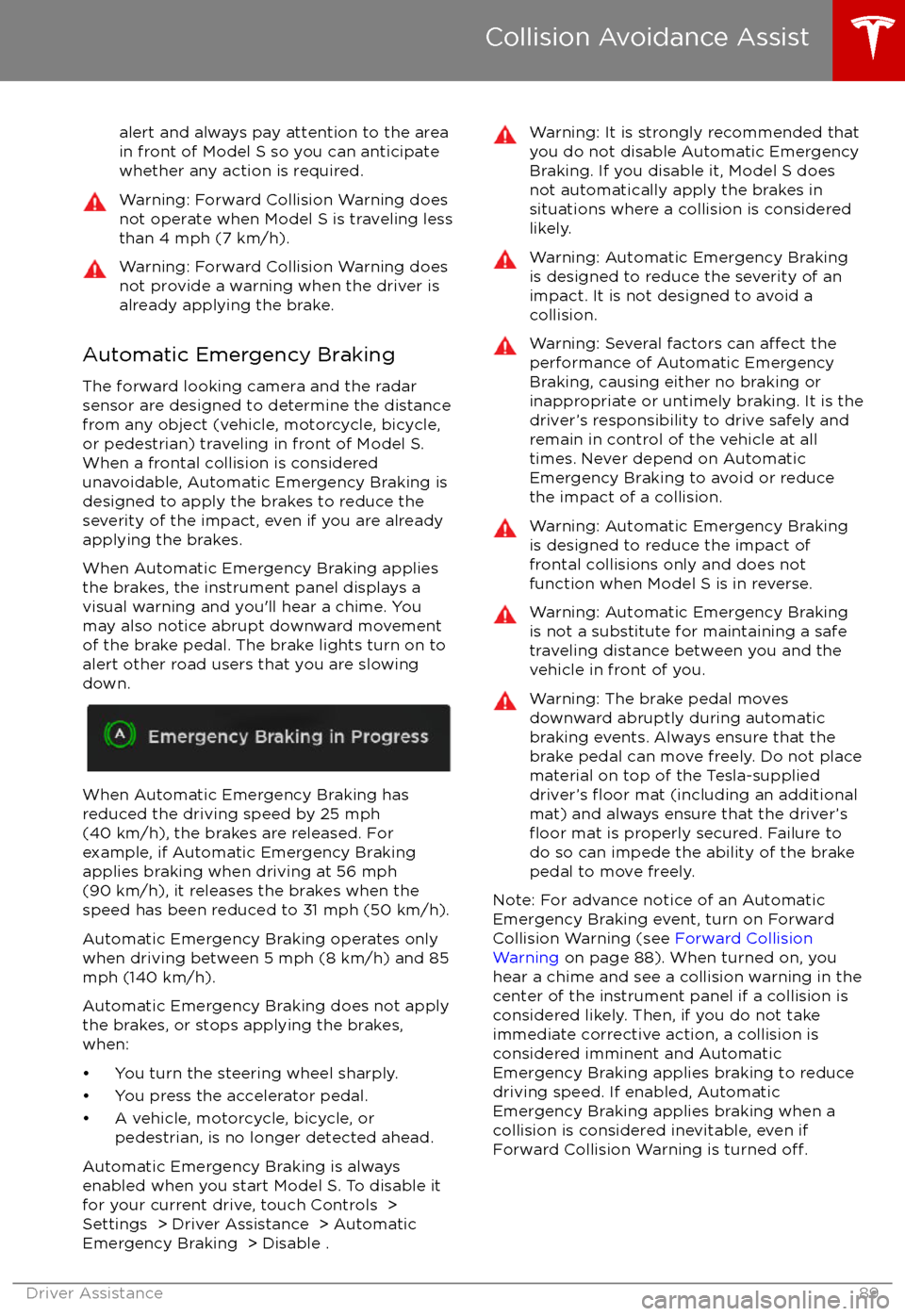
When Automatic Emergency Braking applies
the brakes, the instrument panel displays a visual warning and you
Page 91 of 186
How Speed Assist Works
If Model S is equipped with Driver Assistance
components (see About Driver Assistance on
page 68), the forward looking camera detects
speed limit signs. The speed limit signs are
then analyzed and compared against GPS
data to determine the speed limit at your
current driving location. For routes where no
speed limit signs are present or cannot be detected, speed limits are determined using
GPS data (if available). Instead of determining
the speed limit based on speed limit signs and GPS data, you can also manually enter an
arbitrary speed limit.
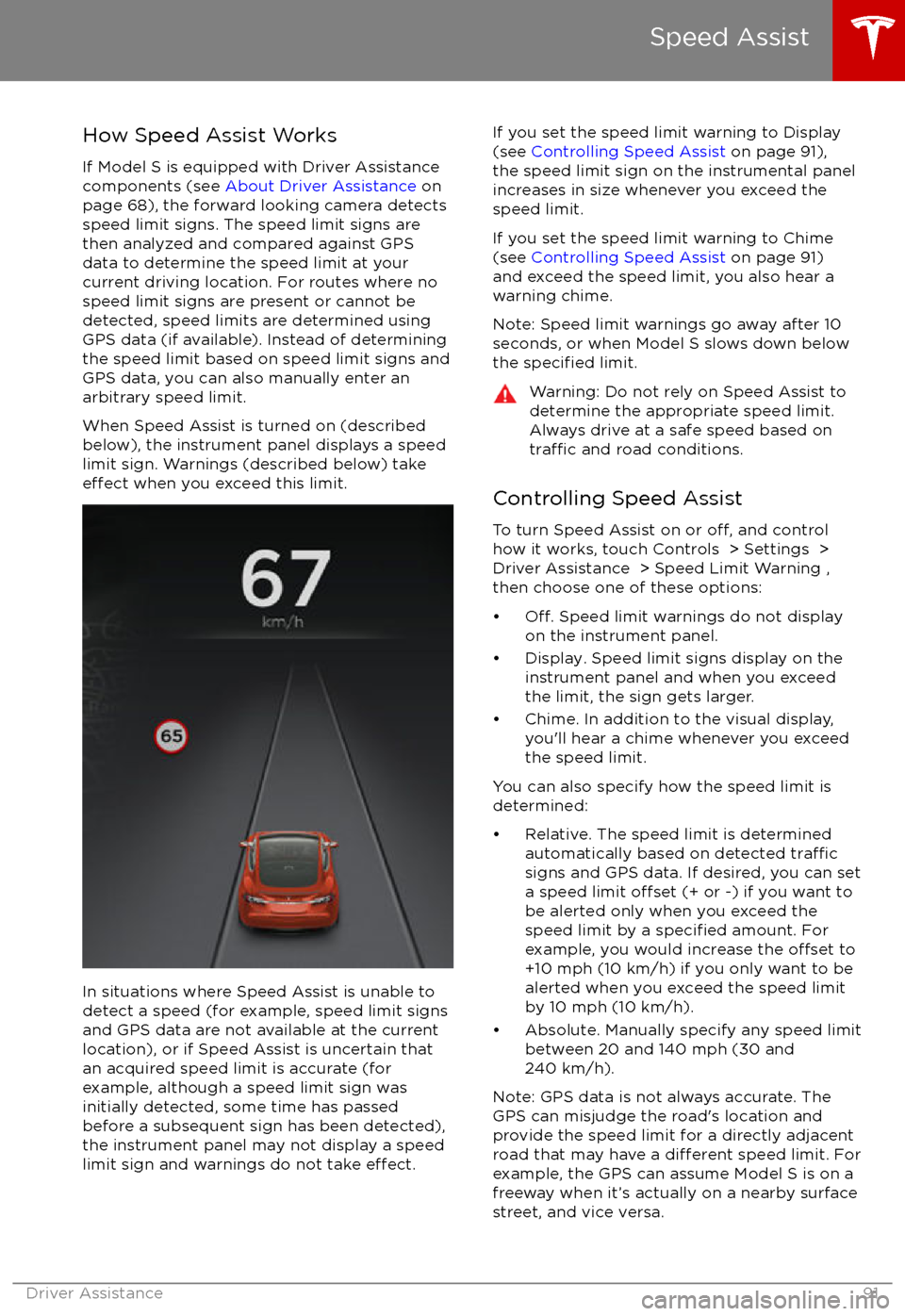
When Speed Assist is turned on (described
below), the instrument panel displays a speed
limit sign. Warnings (described below) take
effect when you exceed this limit.
In situations where Speed Assist is unable to
detect a speed (for example, speed limit signs
and GPS data are not available at the current
location), or if Speed Assist is uncertain that
an acquired speed limit is accurate (for
example, although a speed limit sign was
initially detected, some time has passed
before a subsequent sign has been detected), the instrument panel may not display a speed
limit sign and warnings do not take
effect.
If you set the speed limit warning to Display
(see Controlling Speed Assist on page 91),
the speed limit sign on the instrumental panel
increases in size whenever you exceed the
speed limit.
If you set the speed limit warning to Chime (see Controlling Speed Assist on page 91)
and exceed the speed limit, you also hear a warning chime.
Note: Speed limit warnings go away after 10 seconds, or when Model S slows down below
the
specified limit.
Warning: Do not rely on Speed Assist to
determine the appropriate speed limit. Always drive at a safe speed based on
traffic and road conditions.
Controlling Speed Assist
To turn Speed Assist on or
off, and control
how it works, touch Controls > Settings > Driver Assistance > Speed Limit Warning ,
then choose one of these options:
Page 135 of 186

the touchscreen while parked and plugged in, Model S draws energy from the wall outlet instead
of the Battery.
During Charging During charging, the charge port pulses green and charging status displays on the instrument
panel. The frequency at which the charge port
Page 136 of 186
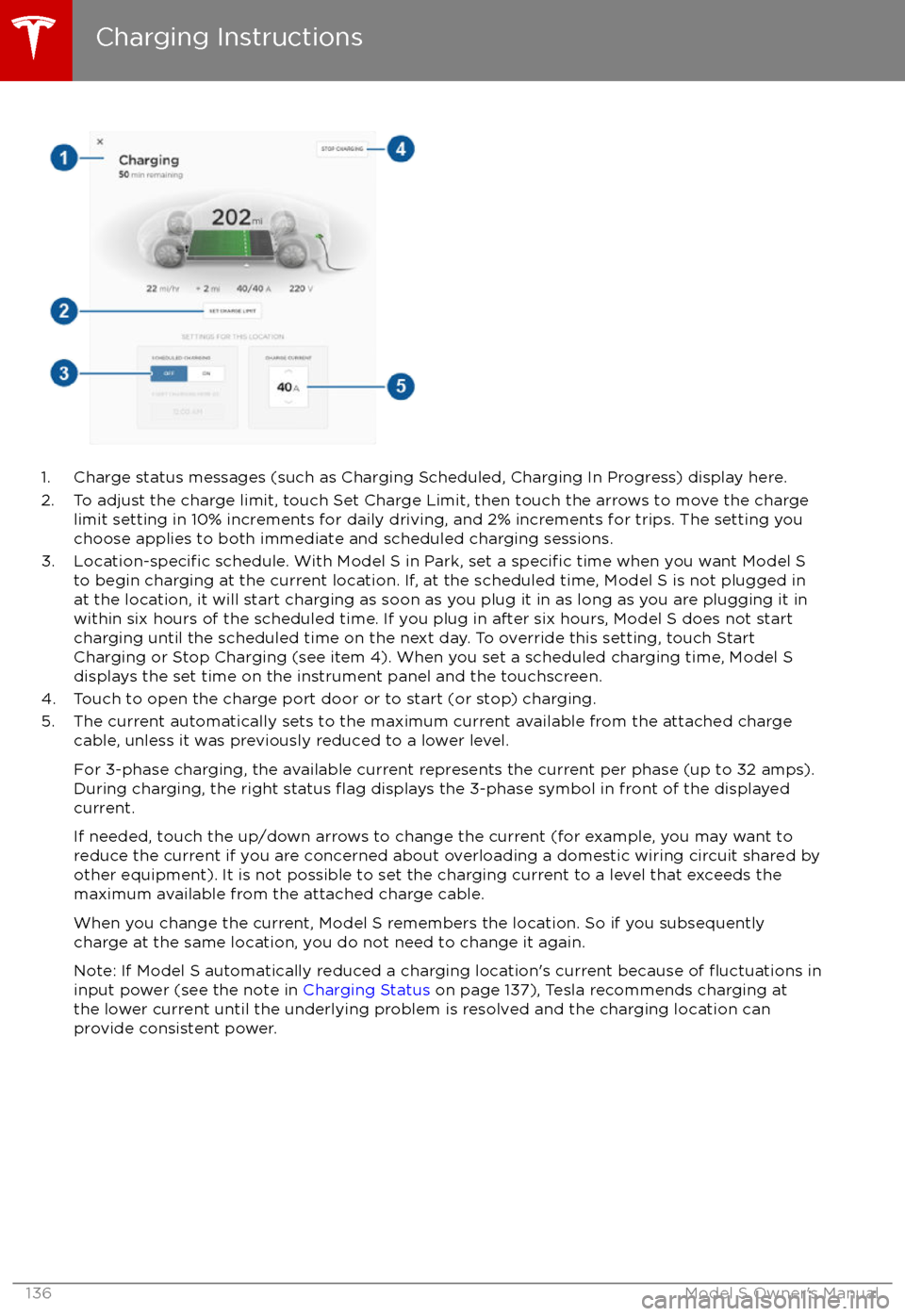
1. Charge status messages (such as Charging Scheduled, Charging In Progress) display here.
2. To adjust the charge limit, touch Set Charge Limit, then touch the arrows to move the charge limit setting in 10% increments for daily driving, and 2% increments for trips. The setting youchoose applies to both immediate and scheduled charging sessions.
3.
Location-specific schedule. With Model S in Park, set a specific time when you want Model S
to begin charging at the current location. If, at the scheduled time, Model S is not plugged in
at the location, it will start charging as soon as you plug it in as long as you are plugging it in
within six hours of the scheduled time. If you plug in after six hours, Model S does not start charging until the scheduled time on the next day. To override this setting, touch Start
Charging or Stop Charging (see item 4). When you set a scheduled charging time, Model S displays the set time on the instrument panel and the touchscreen.
4. Touch to open the charge port door or to start (or stop) charging.
5. The current automatically sets to the maximum current available from the attached charge cable, unless it was previously reduced to a lower level.
For 3-phase charging, the available current represents the current per phase (up to 32 amps).
During charging, the right status
flag displays the 3-phase symbol in front of the displayed
current.
If needed, touch the up/down arrows to change the current (for example, you may want to
reduce the current if you are concerned about overloading a domestic wiring circuit shared by other equipment). It is not possible to set the charging current to a level that exceeds themaximum available from the attached charge cable.
When you change the current, Model S remembers the location. So if you subsequently charge at the same location, you do not need to change it again.
Note: If Model S automatically reduced a charging location
Page 150 of 186

Cleaning the Interior
Frequently inspect and clean the interior to maintain its appearance and to prevent
premature wear. If possible, immediately wipe up spills and remove marks. For general
cleaning, wipe interior surfaces using a soft
cloth (such as micro
fiber) dampened with a
mixture of warm water and mild non-
detergent cleaner (test all cleaners on a
concealed area before use). To avoid streaks,
dry immediately with a soft lint-free cloth.
Interior Glass
Do not scrape, or use any abrasive cleaning
fluid on glass or mirrored surfaces. This can
damage the reflective surface of the mirror
and the heating elements in the rear window.
Airbags
Do not allow any substance to enter an airbag
cover. This could
affect correct operation.
Dashboard and Plastic Surfaces
Do not polish the upper surfaces of the
dashboard. Polished surfaces are
reflectiveand could interfere with your driving view.
Leather Seats
Leather is prone to dye-transfer which can
cause discoloration, particularly on light colored leather. White and tan leather iscoated with an anti-soiling treatment. Wipespills as soon as possible using a soft cloth
moistened with warm water and non-
detergent soap. Wipe gently in a circular
motion. Then wipe dry using a soft, lint-free
cloth. Using detergents or commercially
available leather cleaners and conditioners is
not recommended because they can discolor or dry out the leather.
Polyurethane Seats
Wipe spills as soon as possible using a soft
cloth moistened with warm water and non-
detergent soap. Wipe gently in a circular
motion. After cleaning, allow the seats to air
dry.
Cloth Seats
Wipe spills as soon as possible using a soft
cloth moistened with warm water and non-
detergent soap. Wipe gently in a circular
motion. Then wipe dry using a soft, lint-free
cloth. Vacuum the seats as needed to remove
any loose dirt.
Carpets
Avoid over-wetting carpets. For heavily soiled
areas, use a diluted upholstery cleaner.
Seat Belts
Extend the belts to wipe. Do not use any type
of detergent or chemical cleaning agent.
Allow the belts to dry naturally while
extended, preferably away from direct
sunlight.
Tesla Built-In Rear Facing Child Seats
Vacuum the seats to remove any loose dirt. Wipe the seats with a soft cloth dampened
with warm water. You can also use an upholstery cleaner designed for automotive
use. Extend the belts to wipe. Allow the belts
to dry naturally, preferably away from direct
sunlight.
Touchscreen and Instrument Panel
Clean the touchscreen and instrument panel
using a soft lint-free cloth
specificallydesigned to clean monitors and displays. Do not use cleaners (such as a glass cleaner) and
do not use a wet wipe or a dry statically- charged cloth (such as a recently washed
microfiber). To wipe the touchscreen without
activating buttons and changing settings, you
can enable clean mode. Touch Controls > Displays > Clean Mode . The display darkens
to make it easy to see dust and smudges.
Chrome and Metal Surfaces
Polish, abrasive cleaners or hard cloths can
damage the
finish on chrome and metal
surfaces.
Cautions for Interior Cleaning
Caution: Using solvents (including alcohol), bleach, citrus, naphtha, orsilicone-based products or additives on
interior components can cause damage.Caution: Statically-charged materials can
cause damage to the touchscreen or
instrument panel.Warning: If you notice any damage on an
airbag or seat belt, contact Tesla
immediately.Warning: Do not allow any water,
cleaners, or fabric to enter a seat belt
mechanism.Warning: Exposure to chemical cleaners
can be hazardous and can irritate eyes
Cleaning
150Model S Owner
Page 154 of 186
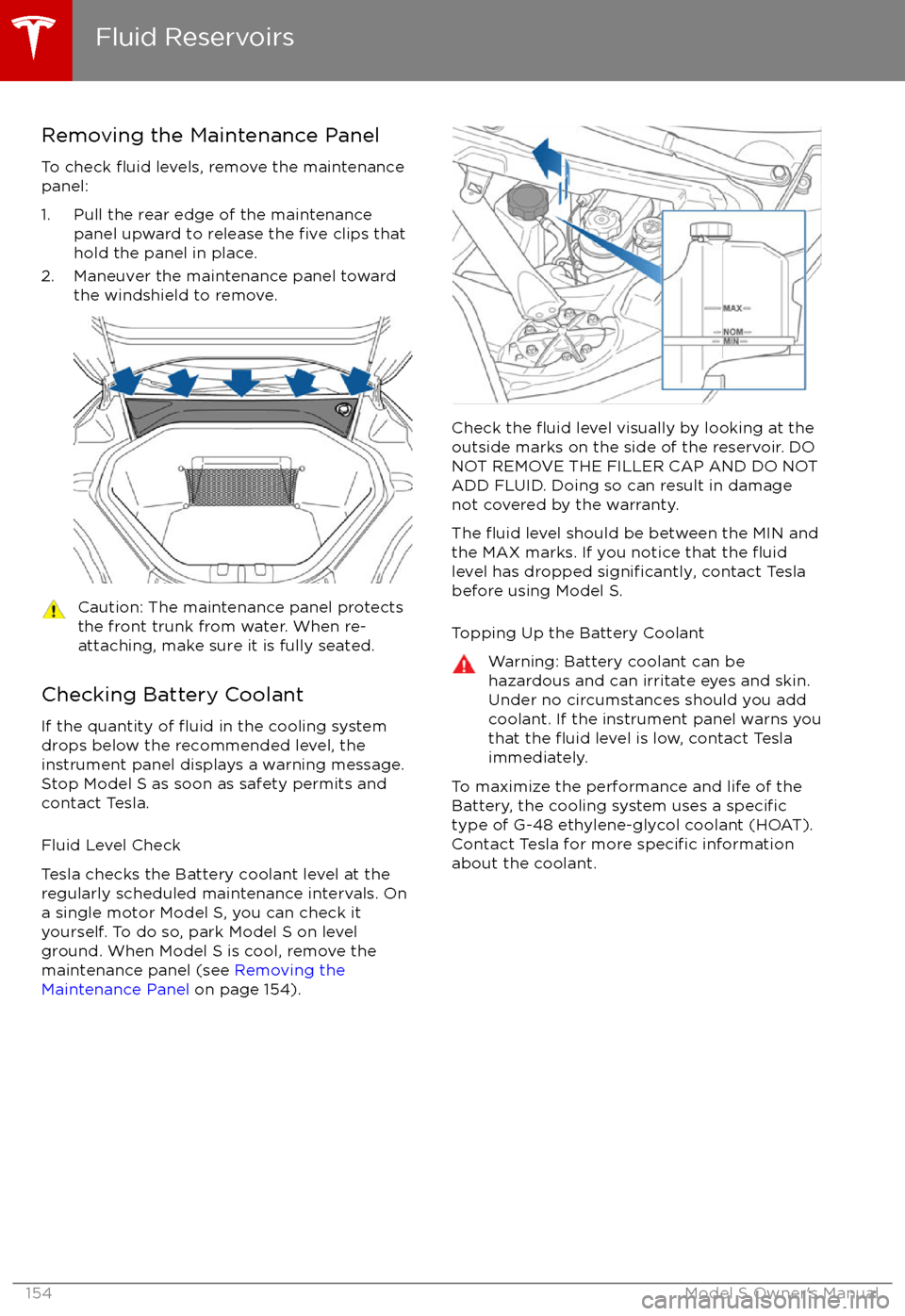
Removing the Maintenance Panel
To check
fluid levels, remove the maintenance
panel:
1. Pull the rear edge of the maintenance panel upward to release the
five clips that
hold the panel in place.
2. Maneuver the maintenance panel toward the windshield to remove.
Caution: The maintenance panel protects
the front trunk from water. When re-
attaching, make sure it is fully seated.
Checking Battery Coolant
If the quantity of
fluid in the cooling system
drops below the recommended level, the
instrument panel displays a warning message.
Stop Model S as soon as safety permits and
contact Tesla.
Fluid Level Check
Tesla checks the Battery coolant level at the
regularly scheduled maintenance intervals. On a single motor Model S, you can check it
yourself. To do so, park Model S on level
ground. When Model S is cool, remove the
maintenance panel (see Removing the
Maintenance Panel on page 154).
Check the fluid level visually by looking at the
outside marks on the side of the reservoir. DO
NOT REMOVE THE FILLER CAP AND DO NOT
ADD FLUID. Doing so can result in damage
not covered by the warranty.
The
fluid level should be between the MIN and
the MAX marks. If you notice that the fluidlevel has dropped significantly, contact Tesla
before using Model S.
Topping Up the Battery Coolant
Warning: Battery coolant can be
hazardous and can irritate eyes and skin.
Under no circumstances should you add
coolant. If the instrument panel warns you
that the
fluid level is low, contact Tesla
immediately.
To maximize the performance and life of the
Battery, the cooling system uses a specifictype of G-48 ethylene-glycol coolant (HOAT).
Contact Tesla for more specific information
about the coolant.
Fluid Reservoirs
154Model S Owner